💟 网站图标下载工具
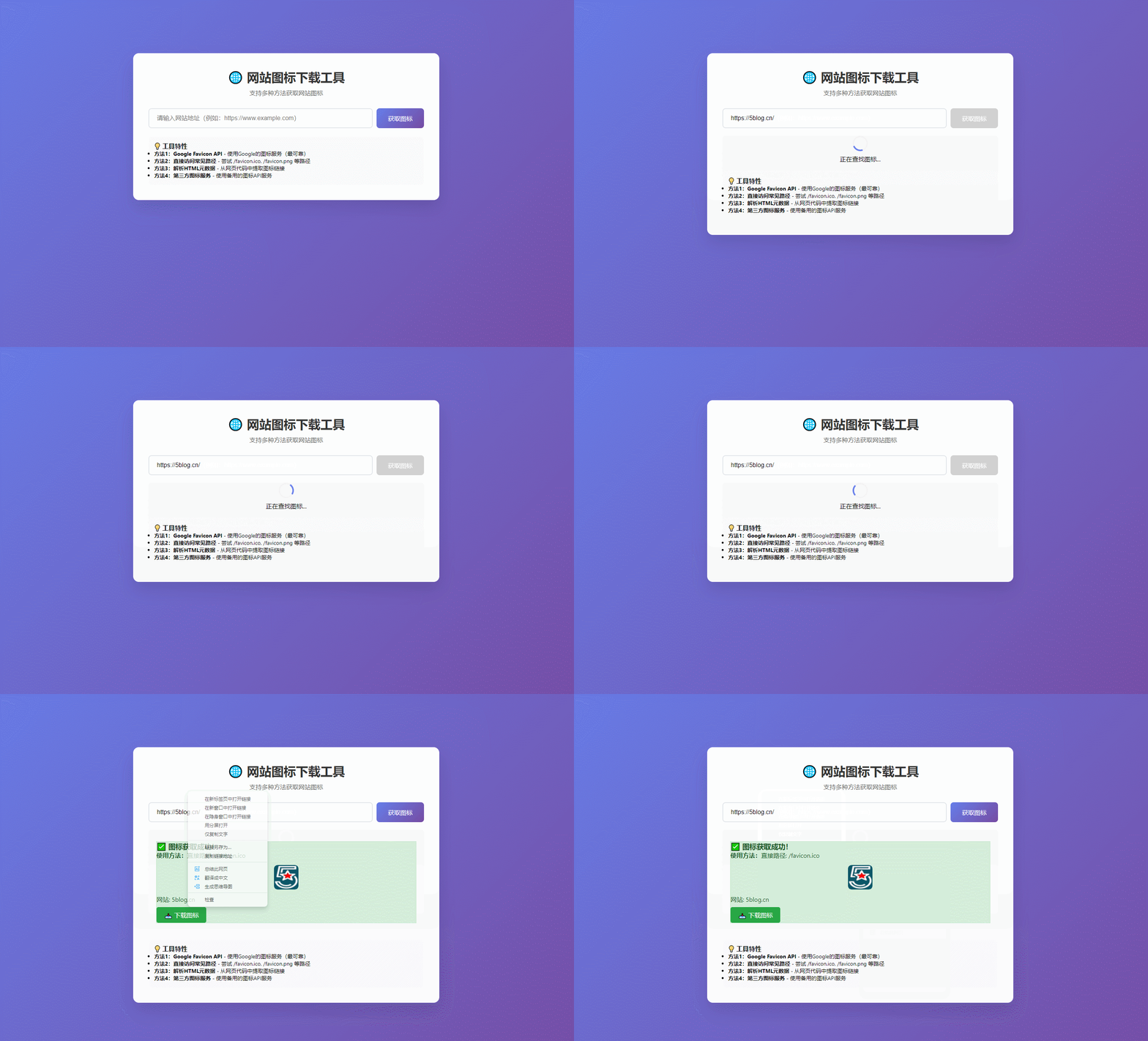
💡 工具特性
方法1:Google Favicon API - 使用Google的图标服务(最可靠)
方法2:直接访问常见路径 - 尝试 /favicon.ico, /favicon.png 等路径
方法3:解析HTML元数据 - 从网页代码中提取图标链接
方法4:第三方图标服务 - 使用备用的图标API服务
复制代码保存HTML 直接可用
代码如下
<!DOCTYPE html>
<html lang="zh-CN">
<head>
    <meta charset="UTF-8">
    <meta name="viewport" content="width=device-width, initial-scale=1.0">
    <title>网站图标下载工具</title>
    <style>
        * {
            margin: 0;
            padding: 0;
            box-sizing: border-box;
        }

        body {
            font-family: 'Segoe UI', Tahoma, Geneva, Verdana, sans-serif;
            background: linear-gradient(135deg, #667eea 0%, #764ba2 100%);
            min-height: 100vh;
            padding: 20px;
        }

        .container {
            max-width: 800px;
            margin: 0 auto;
            background: white;
            border-radius: 15px;
            box-shadow: 0 20px 40px rgba(0, 0, 0, 0.1);
            padding: 40px;
            margin-top: 130px;
        }

        h1 {
            text-align: center;
            color: #333;
            margin-bottom: 10px;
        }

        .subtitle {
            text-align: center;
            color: #666;
            margin-bottom: 30px;
        }

        .input-group {
            display: flex;
            gap: 10px;
            margin-bottom: 20px;
        }

        input[type="text"] {
            flex: 1;
            padding: 15px 20px;
            border: 2px solid #e1e5e9;
            border-radius: 8px;
            font-size: 16px;
        }

        input[type="text"]:focus {
            outline: none;
            border-color: #667eea;
        }

        button {
            background: linear-gradient(135deg, #667eea 0%, #764ba2 100%);
            color: white;
            border: none;
            padding: 15px 30px;
            border-radius: 8px;
            font-size: 16px;
            cursor: pointer;
        }

        button:hover {
            opacity: 0.9;
        }

        button:disabled {
            background: #ccc;
            cursor: not-allowed;
        }

        .result {
            margin-top: 30px;
            padding: 20px;
            border-radius: 8px;
            display: none;
        }

        .success {
            background: #d4edda;
            border: 1px solid #c3e6cb;
            color: #155724;
        }

        .error {
            background: #f8d7da;
            border: 1px solid #f5c6cb;
            color: #721c24;
        }

        .icon-preview {
            width: 64px;
            height: 64px;
            margin: 15px auto;
            display: block;
            border-radius: 8px;
        }

        .download-link {
            display: inline-block;
            background: #28a745;
            color: white;
            padding: 10px 20px;
            border-radius: 5px;
            text-decoration: none;
            margin-top: 10px;
        }

        .loading {
            display: none;
            text-align: center;
            margin: 20px 0;
        }

        .spinner {
            border: 4px solid #f3f3f3;
            border-top: 4px solid #667eea;
            border-radius: 50%;
            width: 40px;
            height: 40px;
            animation: spin 1s linear infinite;
            margin: 0 auto 10px;
        }

        @keyframes spin {
            0% { transform: rotate(0deg); }
            100% { transform: rotate(360deg); }
        }

        .method-info {
            margin-top: 20px;
            padding: 15px;
            background: #f8f9fa;
            border-radius: 8px;
            font-size: 14px;
        }
    </style>
</head>
<body>
    <div class="container">
        <h1>🌐 网站图标下载工具</h1>
        <p class="subtitle">支持多种方法获取网站图标</p>

        <div class="input-group">
            <input type="text" id="websiteUrl" placeholder="请输入网站地址(例如:https://www.example.com)" autocomplete="off">
            <button id="downloadBtn" onclick="downloadFavicon()">获取图标</button>
        </div>

        <div class="loading" id="loading">
            <div class="spinner"></div>
            <p>正在查找图标...</p>
        </div>

        <div class="result" id="result"></div>

        <div class="method-info">
            <h3>💡 工具特性</h3>
            <ul>
                <li><strong>方法1:Google Favicon API</strong> - 使用Google的图标服务(最可靠)</li>
                <li><strong>方法2:直接访问常见路径</strong> - 尝试 /favicon.ico, /favicon.png 等路径</li>
                <li><strong>方法3:解析HTML元数据</strong> - 从网页代码中提取图标链接</li>
                <li><strong>方法4:第三方图标服务</strong> - 使用备用的图标API服务</li>
            </ul>
        </div>
    </div>

    <script>
        async function downloadFavicon() {
            const urlInput = document.getElementById('websiteUrl');
            const downloadBtn = document.getElementById('downloadBtn');
            const loading = document.getElementById('loading');
            const result = document.getElementById('result');

            const websiteUrl = urlInput.value.trim();

            if (!websiteUrl) {
                showResult('error', '请输入网站地址');
                return;
            }

            // 添加协议头
            let processedUrl = websiteUrl;
            if (!processedUrl.startsWith('http://') && !processedUrl.startsWith('https://')) {
                processedUrl = 'https://' + processedUrl;
            }

            // 验证URL
            try {
                new URL(processedUrl);
            } catch (e) {
                showResult('error', '请输入有效的网站地址');
                return;
            }

            // 显示加载状态
            downloadBtn.disabled = true;
            loading.style.display = 'block';
            result.style.display = 'none';

            try {
                const faviconData = await getFavicon(processedUrl);

                if (faviconData.success) {
                    const domain = new URL(processedUrl).hostname;
                    const timestamp = new Date().getTime();
                    const filename = `${domain}_favicon_${timestamp}.${faviconData.type || 'png'}`;

                    result.innerHTML = `
                        <div class="success">
                            <h3>✅ 图标获取成功!</h3>
                            <p><strong>使用方法:</strong>${faviconData.method}</p>
                            <img src="${faviconData.url}" alt="网站图标" class="icon-preview" onerror="this.style.display='none'">
                            <p>网站: ${domain}</p>
                            <a href="${faviconData.url}" download="${filename}" class="download-link">📥 下载图标</a>
                        </div>
                    `;
                } else {
                    showResult('error', `❌ 未找到该网站的图标<br><br>尝试的方法:<br>${faviconData.methods.join('<br>')}`);
                }
            } catch (error) {
                console.error('下载失败:', error);
                showResult('error', '❌ 下载失败,请检查网络连接或网站地址');
            } finally {
                downloadBtn.disabled = false;
                loading.style.display = 'none';
                result.style.display = 'block';
            }
        }

        async function getFavicon(websiteUrl) {
            const domain = new URL(websiteUrl).hostname;
            const methods = [];

            // 方法1: Google Favicon API
            methods.push('Google Favicon API');
            const googleApiUrl = `https://www.google.com/s2/favicons?domain=${domain}&sz=256`;
            if (await testImageLoad(googleApiUrl)) {
                return {
                    success: true,
                    url: googleApiUrl,
                    method: 'Google Favicon API',
                    type: 'png',
                    methods: methods
                };
            }

            // 方法2: 直接访问常见路径
            const commonPaths = [
                '/favicon.ico',
                '/favicon.png',
                '/favicon.jpg',
                '/favicon.jpeg',
                '/favicon.gif',
                '/favicon.svg',
                '/apple-touch-icon.png',
                '/apple-touch-icon-precomposed.png'
            ];

            for (const path of commonPaths) {
                methods.push(`直接路径: ${path}`);
                const testUrl = websiteUrl.replace(/\/$/, '') + path;
                if (await testImageLoad(testUrl)) {
                    return {
                        success: true,
                        url: testUrl,
                        method: `直接路径: ${path}`,
                        type: path.split('.').pop(),
                        methods: methods
                    };
                }
            }

            // 方法3: 解析HTML元数据
            methods.push('解析HTML元数据');
            try {
                const response = await fetch(websiteUrl, {
                    headers: {
                        'User-Agent': 'Mozilla/5.0 (Windows NT 10.0; Win64; x64) AppleWebKit/537.36'
                    }
                });

                if (response.ok) {
                    const html = await response.text();
                    const parser = new DOMParser();
                    const doc = parser.parseFromString(html, 'text/html');

                    const iconSelectors = [
                        'link[rel="icon"]',
                        'link[rel="shortcut icon"]',
                        'link[rel="apple-touch-icon"]',
                        'link[rel="apple-touch-icon-precomposed"]',
                        'meta[itemprop="image"]'
                    ];

                    for (const selector of iconSelectors) {
                        const element = doc.querySelector(selector);
                        if (element) {
                            const href = element.getAttribute('href') || element.getAttribute('content');
                            if (href) {
                                const iconUrl = new URL(href, websiteUrl).href;
                                if (await testImageLoad(iconUrl)) {
                                    return {
                                        success: true,
                                        url: iconUrl,
                                        method: `HTML解析: ${selector}`,
                                        type: href.split('.').pop(),
                                        methods: methods
                                    };
                                }
                            }
                        }
                    }
                }
            } catch (e) {
                console.log('HTML解析失败:', e);
            }

            // 方法4: 第三方图标服务
            methods.push('第三方图标服务');
            const thirdPartyUrls = [
                `https://icon.horse/icon/${domain}`,
                `https://t2.gstatic.com/faviconV2?client=SOCIAL&type=FAVICON&fallback_opts=TYPE,SIZE,URL&url=http://${domain}&size=256`,
                `https://www.google.com/s2/favicons?domain=${domain}`
            ];

            for (const apiUrl of thirdPartyUrls) {
                if (await testImageLoad(apiUrl)) {
                    return {
                        success: true,
                        url: apiUrl,
                        method: '第三方图标服务',
                        type: 'png',
                        methods: methods
                    };
                }
            }

            return {
                success: false,
                methods: methods
            };
        }

        function testImageLoad(url) {
            return new Promise((resolve) => {
                const img = new Image();
                img.onload = () => resolve(true);
                img.onerror = () => resolve(false);
                img.src = url;

                setTimeout(() => resolve(false), 5000);
            });
        }

        function showResult(type, message) {
            const result = document.getElementById('result');
            result.className = `result ${type}`;
            result.innerHTML = message;
        }

        // 回车键支持
        document.getElementById('websiteUrl').addEventListener('keypress', function(e) {
            if (e.key === 'Enter') {
                downloadFavicon();
            }
        });
    </script>
</body>
</html>
演示地址
阅读:1264
发布时间: